Blog & Changelog

Updates, new tool releases, DevOps tips and the engineering decisions behind DevOpsArsenal.

All ๐Ÿš€ Releases ๐Ÿ“ Articles ๐Ÿ’ก Tips ๐Ÿ”’ Security
๐Ÿ“‹ Recent Changes
v1.22025-05-21
NEWFAQ schema on all 50 tools ยท About page ยท Blog/Changelog page
v1.12025-05-20
NEW15 new tools (JSON Formatter, Color Converter, SQL Formatter, URL Encoder, HTML Entity, CSV-JSON, SSH Keygen, Nginx Config, Git Commit Linter, Epoch Batch, AI Prompt Library, Regex Library, Status Code Picker, Terraform Diff, Latency Percentiles)
v1.02025-05-19
NEWInitial launch with 35 tools ยท Charming Seaside design ยท AdSense integration ยท SEO optimization
v1.02025-05-19
IMPROVECustom cursors ยท Glassmorphic cards ยท 5 responsive breakpoints ยท Lighter gradient background
v1.02025-05-19
FIXSecurity headers (CSP, HSTS, X-Frame-Options) ยท SRI on CDN scripts ยท Performance: font loading, CSS preload, critical inline CSS

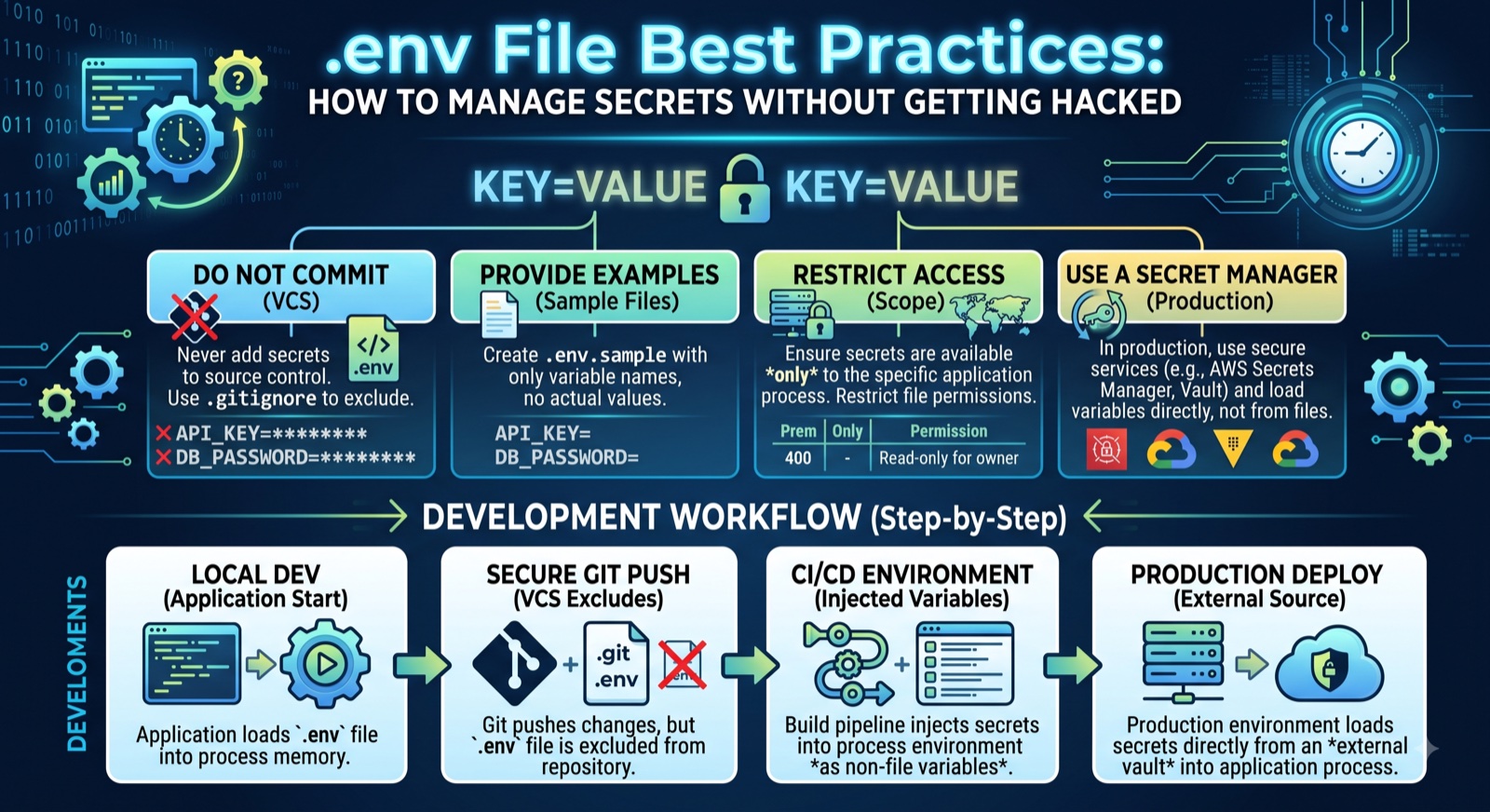
๐Ÿ”’ .env File Best Practices: How to Manage Secrets Without Getting Hacked

The most common way developers expose secrets is a Git commit. GitGuardian detected 12 million hardcoded secrets in public GitHub repos in 2023. This guide covers gitignore rules, startup validation, secret managers, and the .env patterns every team should follow.

Read full article โ†’

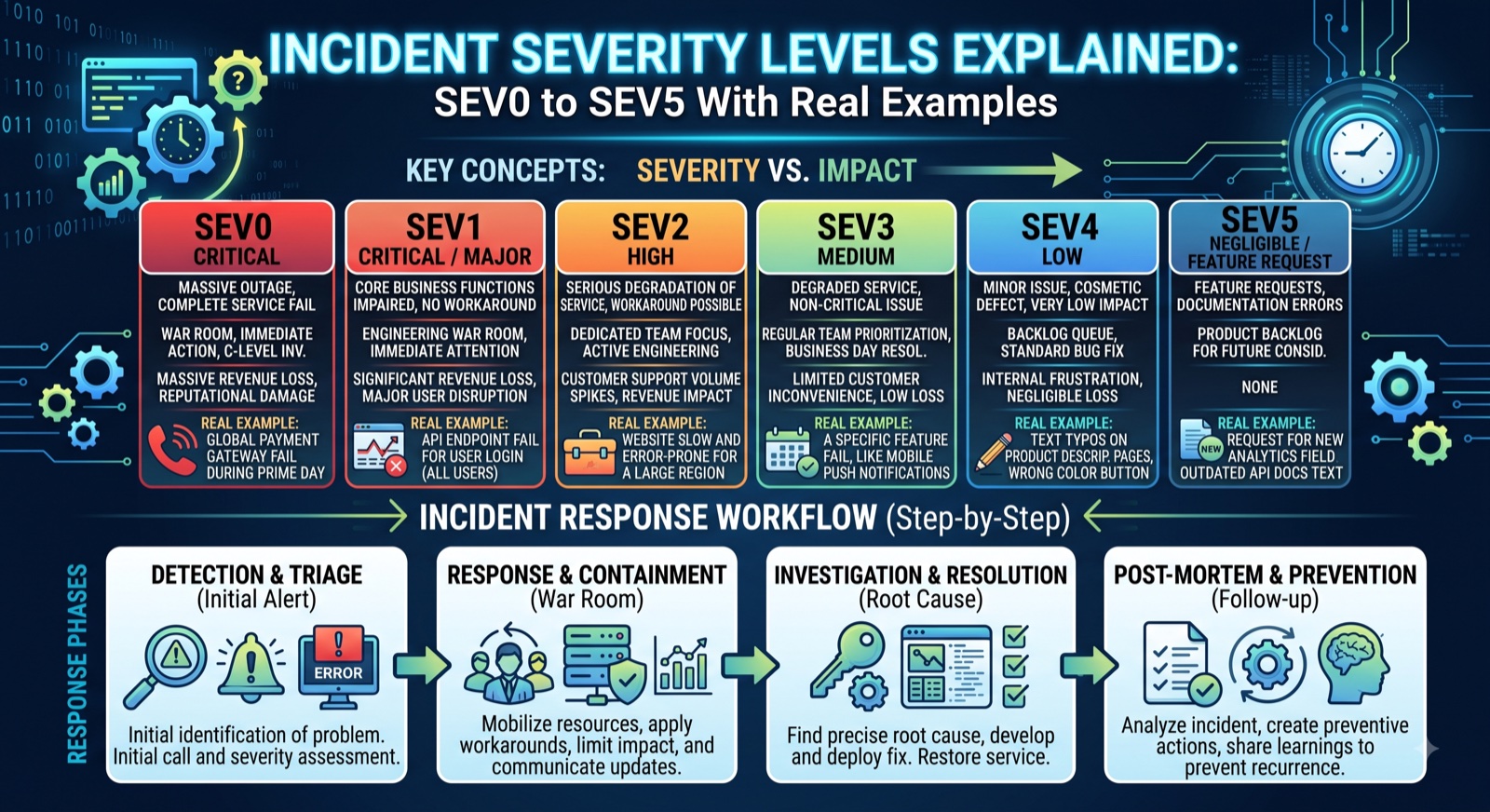
๐Ÿšจ Incident Severity Levels Explained: SEV0 to SEV5 With Real Examples

What is the difference between a SEV1 and a SEV2? This guide explains the full SEV0โ€“SEV5 framework with real examples, response time expectations, escalation paths, and a free severity matrix calculator for on-call teams.

Read full article โ†’

๐Ÿšฆ API Rate Limiting Strategies: Token Bucket, Leaky Bucket, and How to Choose

There are four main rate limiting algorithms and choosing the wrong one causes real problems โ€” either you throttle legitimate users or let bursts overwhelm your backend. Includes burst limit formula, HTTP 429 headers, and retry-with-jitter code.

Read full article โ†’

โ˜๏ธ AWS vs GCP vs Azure CLI: The Command Reference Every Cloud Engineer Bookmarks

Stop tabbing between three browser windows of documentation. This side-by-side cheat sheet puts the most common AWS, GCP, and Azure CLI commands in one place โ€” compute, storage, IAM, and logging โ€” with a free cloud CLI command builder.

Read full article โ†’

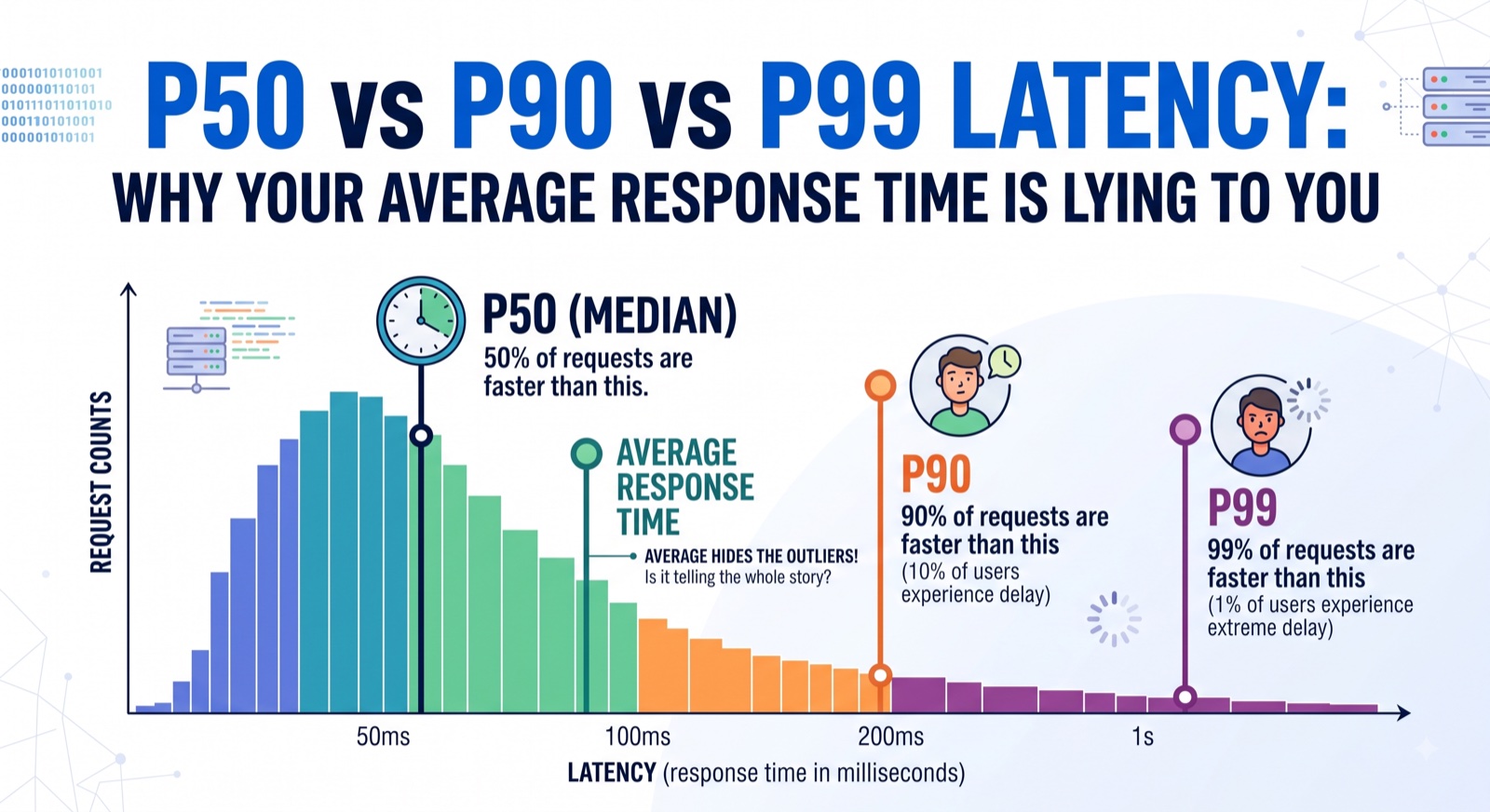
โšก P50 vs P90 vs P99 Latency: Why Your Average Response Time Is Lying to You

Average API response time hides your worst user experiences entirely. Learn what P50, P90, and P99 latency percentiles actually mean, how to calculate them from raw data, and why SRE teams set SLOs on P99 โ€” not the mean.

Read full article โ†’

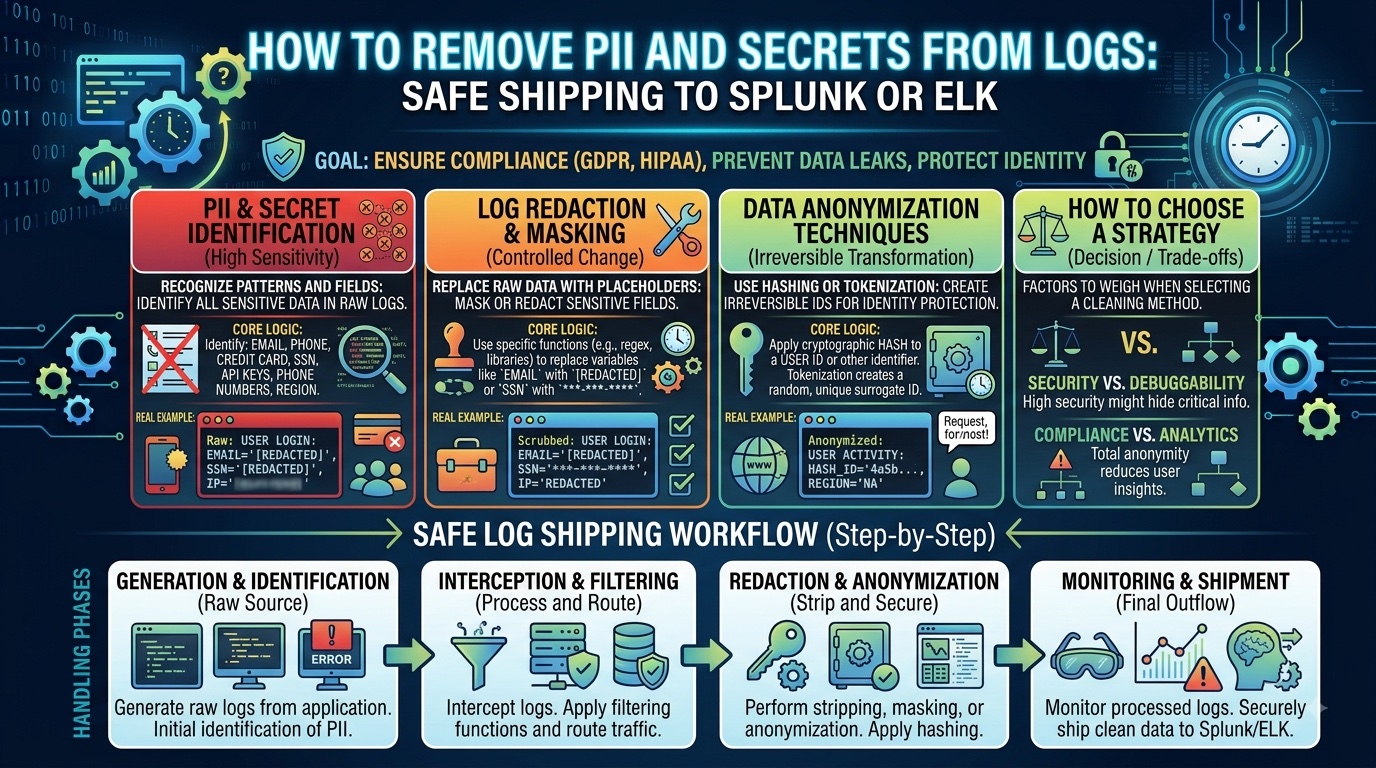
๐Ÿ›ก How to Remove PII and Secrets from Logs Before Shipping to Splunk or ELK

Learn how to mask PII, API keys, and secrets from application logs before they reach Splunk, ELK, or Datadog. Includes regex patterns for Node.js, Python, Fluent Bit and Logstash โ€” plus a free browser-based log masker tool.

Read full article โ†’

๐Ÿš€ DevOpsArsenal Launches with 50 Free Browser-Based Tools

We are launching DevOpsArsenal โ€” a collection of 50 free tools built specifically for DevOps engineers, cloud architects and developers. Every tool runs 100% in your browser. No signup, no backend, no data collection.

Why Another Developer Tool Site?

Most online developer tools have at least one of these problems: they require signup, they send your data to a server, they are slow and bloated with ads, or they charge for basic features. We wanted tools that just work โ€” paste input, get output, copy and go.

What's Included

50 tools across 6 categories:

  • Security (9): JWT Decoder, Base64, Hash Generator, HMAC, Password Generator, Password Strength Analyzer, SSL Certificate Inspector, SSH Key Generator, Log Masker
  • Networking (5): CIDR Calculator, DNS Lookup, IP Geolocation, HTTP Status & Headers Reference, Port Reference
  • Cloud & DevOps (10): K8s YAML Validator, Dockerfile Generator, Nginx Config Generator, .gitignore Generator, .env Validator, Cron Explainer, Cloud Cost Estimator, Cloud Latency Map, Git Commit Linter, Terraform Plan Viewer
  • SRE (4): SLA Calculator, Incident Severity Matrix, Rate Limit Calculator, Latency Percentile Calculator
  • Data Formats (7): YAML/JSON/TOML Converter, Diff Viewer, JSON Path Tester, cURL Converter, JSON Formatter, SQL Formatter, CSV-JSON Converter
  • Utilities (15): Regex Tester, UUID Generator, Unix Timestamp, Text Case Converter, Word Counter, Duplicate Remover, Markdown Preview, chmod Calculator, URL Encoder, HTML Entity Encoder, Color Converter, Epoch Batch Converter, Regex Library, AI Prompt Library, HTTP Status Code Picker

Technical Architecture

Every tool is a single HTML file with embedded CSS and JavaScript. No build step, no npm, no frameworks. We use the browser's native Web Crypto API for all cryptographic operations (hashing, HMAC, key generation) instead of custom implementations. The only external dependency is forge.js for X.509 certificate parsing in the SSL Inspector.

The entire site is static and deployed on Netlify CDN with Brotli compression, achieving sub-200ms page loads globally. Average page transfer size is approximately 11KB.

๐Ÿ“ Why We Built Everything Client-Side (And You Should Too)

The architectural decision behind making every tool run in the browser with zero server-side processing โ€” and how it affects privacy, performance, cost and developer trust.

The Trust Problem

When you paste a JWT token or API key into a server-side tool, you are trusting that server not to log, store or transmit your secrets. Most developers do this dozens of times a day without thinking. We decided to eliminate that trust requirement entirely.

How It Works

Every DevOpsArsenal tool processes data using JavaScript running in your browser tab. The browser's sandboxed environment ensures your data stays in memory only for the current session. When you close the tab, it is gone.

For cryptographic operations, we use crypto.subtle (the Web Crypto API) which provides hardware-accelerated, timing-attack-resistant implementations of SHA-256, SHA-512, HMAC, RSA key generation and more. This is the same API that password managers and banking sites use.

The Performance Benefit

No server round-trips means instant results. Our hash generator computes SHA-256 in under 1ms for typical inputs. CIDR calculations, regex matching, JSON formatting โ€” all happen at native speed in the browser's V8 engine. No loading spinners, no "processing" delays.

The Cost Benefit

With zero server-side compute, our hosting cost is effectively zero (Netlify's free tier handles static file serving). This means we can offer all 50 tools free forever โ€” there are no compute costs that scale with usage.
๐Ÿ’ก 5 JWT Mistakes That Will Get You Hacked

Common JWT implementation mistakes we see in the tokens people decode with our JWT tool โ€” and how to avoid them in your own applications.

1. Using "none" Algorithm

If your JWT library accepts alg: none, an attacker can forge any token by simply removing the signature. Always validate the algorithm server-side and reject unsigned tokens.

2. Storing Secrets in the Payload

JWT payloads are Base64-encoded, not encrypted. Anyone with the token can decode it. Never put passwords, API keys, or sensitive PII in JWT claims. Use encrypted JWE if you need confidential claims.

3. No Expiry (exp claim)

A JWT without an expiry is valid forever โ€” even after the user changes their password. Always set short-lived tokens (15-60 minutes for access tokens) with refresh token rotation.

4. Weak Signing Keys

Using a short string like secret or password123 as your HMAC key means it can be brute-forced. Use at least 256 bits (32 bytes) of cryptographic randomness. Better yet, use RS256 with an RSA key pair.

5. Not Validating the Issuer

If you accept tokens from any issuer (iss claim), an attacker with their own JWT signing key can mint valid tokens. Always validate iss, aud and sub claims against expected values.

Try our JWT Decoder to inspect your tokens and check for these issues.

๐Ÿ”’ The 6 HTTP Security Headers Every Site Needs in 2025

A quick reference for the essential security headers that should be on every production web server โ€” and how to set them up in Nginx, Apache and Netlify.

1. Content-Security-Policy (CSP)

Controls which resources the browser is allowed to load. Prevents XSS by blocking inline scripts and unauthorized external sources. Start with default-src 'self' and whitelist what you need.

2. Strict-Transport-Security (HSTS)

Forces browsers to always use HTTPS. Set max-age=31536000; includeSubDomains; preload and submit to the HSTS preload list for maximum protection.

3. X-Content-Type-Options

Set to nosniff to prevent browsers from MIME-sniffing a response away from the declared Content-Type. Stops attackers from disguising executable content as images.

4. X-Frame-Options

Set to DENY or SAMEORIGIN to prevent your site from being embedded in iframes โ€” the primary defence against clickjacking attacks.

5. Referrer-Policy

Controls how much referrer information is shared with other sites. strict-origin-when-cross-origin is a good default โ€” shares origin for cross-site requests but full URL for same-origin.

6. Permissions-Policy

Disables browser features you do not use: camera=(), microphone=(), geolocation=(). Reduces attack surface by preventing malicious scripts from accessing sensitive APIs.

Check our HTTP Headers Reference for the full list with examples.

๐Ÿ’ก CIDR Subnet Cheatsheet โ€” The Only Table You Need

The most-referenced CIDR table for cloud networking โ€” subnet mask, usable hosts and common cloud use cases for every prefix from /8 to /32.

CIDRMaskHostsUse Case
/8255.0.0.016.7MAWS VPC max, Class A
/16255.255.0.065,534Large VPC, AWS default
/20255.255.240.04,094Large subnet, K8s nodes
/24255.255.255.0254Standard subnet, most common
/28255.255.255.24014Small ELB subnet, NAT gateway
/32255.255.255.2551Single host, security group rule

Use our CIDR Calculator for instant subnet calculations.